
Switching
A switcher’s Settings → Switching page decides when and how NOALBS switches scenes. The rules are the same as NOALBS’s on your PC.
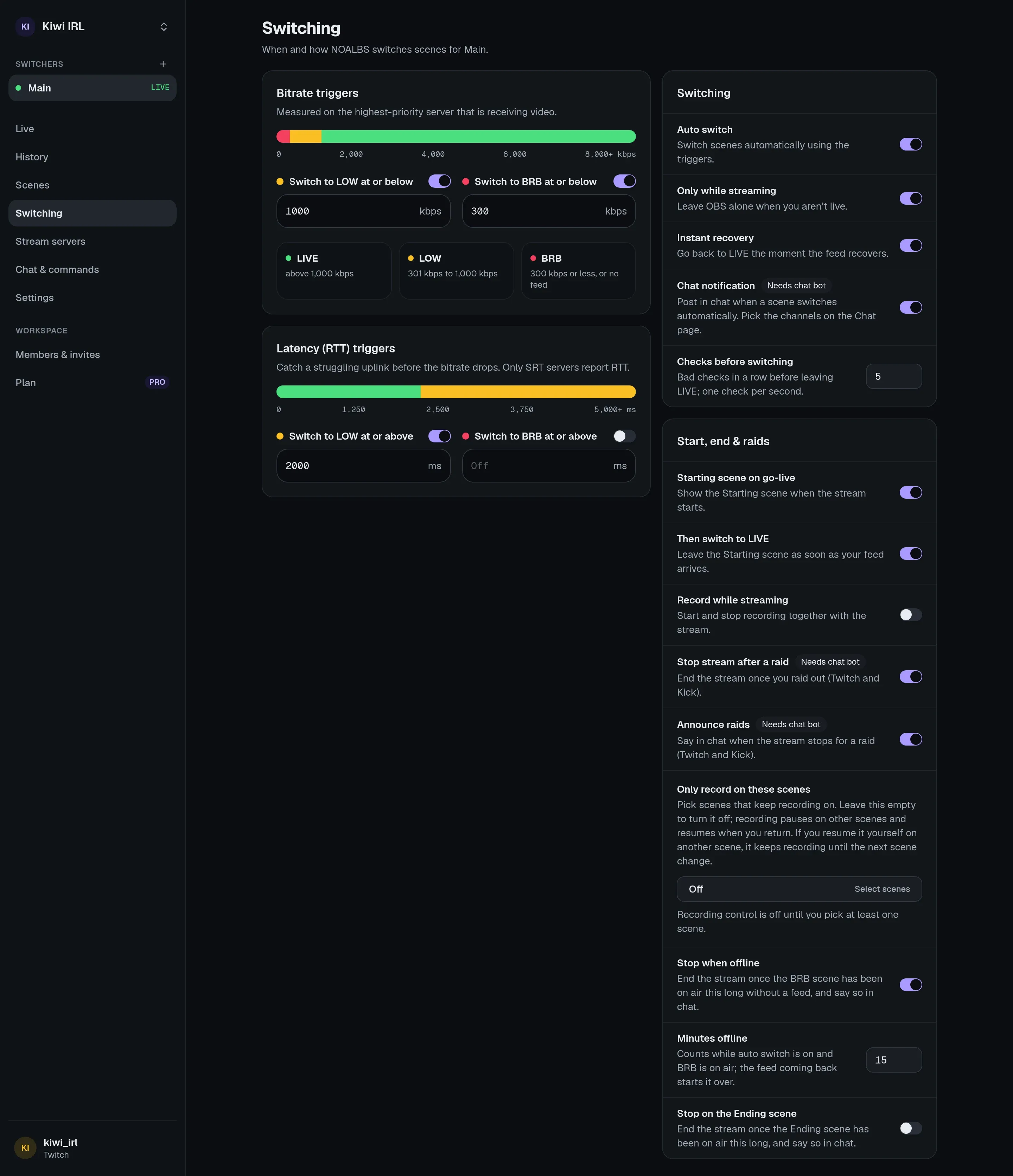
Triggers
Section titled “Triggers”Bitrate
Section titled “Bitrate”| Setting | Default | |
|---|---|---|
| Switch to LOW at or below | 800 kbps | |
| Switch to BRB at or below | off | Off means BRB only when there’s no feed at all. |
The BRB bitrate must be lower than the LOW one. The bar on the page shows which range leads to which scene.
Latency (RTT)
Section titled “Latency (RTT)”Round-trip time catches a struggling uplink before the bitrate drops. Only SRT servers report it.
| Setting | Default |
|---|---|
| Switch to LOW at or above | 2500 ms |
| Switch to BRB at or above | off |
The BRB RTT must be higher than the LOW one. Leave a trigger empty to turn it off. Moderators
can change all four from chat: !trigger, !otrigger, !rtrigger, !ortrigger.
Both are measured on the first server in your list that is receiving video (see stream servers). The worse of the two decides.
Switching
Section titled “Switching”| Setting | Default | |
|---|---|---|
| Auto switch | on | Switch scenes automatically using the triggers. Off: NOALBS only shows numbers and runs commands. |
| Only while streaming | on | Leave OBS alone when you aren’t live. Turn it off to test switching without going live. |
| Instant recovery | on | When the feed comes back after BRB, switch at once instead of waiting for the checks below. |
| Chat notification | on | Post in chat when a scene switches automatically. Needs the chat bot. |
| Checks before switching | 5 | See below. |
Checks before switching
Section titled “Checks before switching”NOALBS checks once a second. When the feed changes, say from LIVE to LOW, the new state must hold for this many more checks in a row before NOALBS switches. With 5, a dip has to last about 6 seconds. That keeps a short hiccup from flashing the LOW scene on stream.
It applies in both directions: going back from LOW to LIVE also waits. The exceptions:
- Instant recovery (above): from BRB to a feed at once.
- Servers that push their stats instead of being read (IRLHosting WebSocket) drop to LOW or BRB at once, and always wait before going back to LIVE.
Set it to 0 to switch on the first bad check.
When a feed connects without a bitrate yet
Section titled “When a feed connects without a bitrate yet”Right after your encoder connects, some servers report the stream with 0 kbps for a moment. NOALBS doesn’t treat that as LOW: it keeps (or goes back to) the LIVE or LOW scene you were on and waits for a real number.
Start, end and raids
Section titled “Start, end and raids”| Setting | Default | |
|---|---|---|
| Starting scene on go-live | off | Show the Starting scene when the stream starts. |
| Then switch to LIVE | off | Leave the Starting scene as soon as your feed arrives. |
| Record while streaming | off | Start and stop recording together with the stream. |
| Stop stream after a raid | off | End the stream once you raid out (Twitch and Kick). Needs the chat bot. |
| Announce raids | off | Say in chat when the stream stops for a raid, with a link to the raided channel. |
Stopping automatically
Section titled “Stopping automatically”- Stop when offline: end the stream once the BRB scene has been on air this long (in minutes) without a feed. Handy when the encoder died and you can’t reach OBS.
- Stop on the Ending scene: end the stream once the Ending scene has been on air this long. This works even with Auto switch off, since you put that scene there yourself.
Both say in chat that they stopped the stream, if a chat is connected. Leave them empty for off. If BELABOX or Moblin are set to stop with the OBS stream, they stop too.
Only record on these scenes
Section titled “Only record on these scenes”Pick scenes that keep recording on. While you record, the recording pauses on any other scene and resumes when you come back to one of these. Leave it empty to turn it off.
If you resume the recording yourself on another scene, it keeps recording until the next scene change. Some recording formats can’t be paused; the activity feed says so when OBS refuses.
Paused switchers
Section titled “Paused switchers”A switcher over its plan’s limit (after a downgrade) is paused: it stays connected and shows its numbers but doesn’t switch or take commands. Upgrade, or delete another switcher, and it resumes on its own.