
Moblin
Moblin has a remote control: an “assistant” can watch and control the phone while it streams. NOALBS Cloud can be that assistant, so you see its bitrate, bonding and battery and control it from the dashboard and chat. This is optional and doesn’t need OBS open.
Moblin’s numbers aren’t used for switching: add the server Moblin streams to as a stream server for that.
Connecting
Section titled “Connecting”On the switcher’s Settings page, under Moblin, press Set up Moblin. NOALBS makes a password and shows the steps:
- In Moblin, open Settings → Remote control and set the Password to the one shown.
- Open Streamer → Assistant and enter the Assistant URL shown.
- Turn Enabled on under Streamer.
Moblin has one remote control password. If you already use one elsewhere, choose Use my own password and enter it instead. A new password disconnects the Moblin connected now until you enter it there.
On the Live page
Section titled “On the Live page”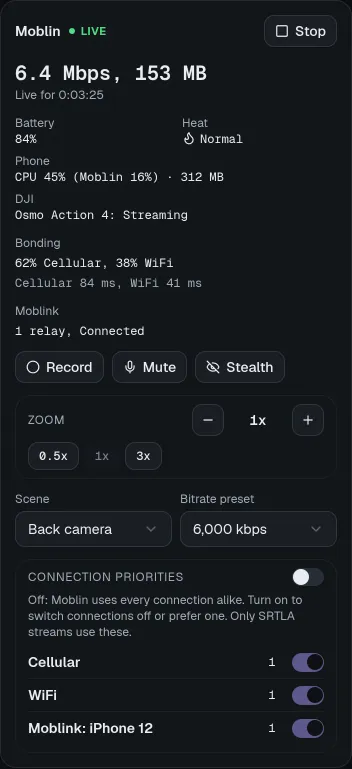
The Moblin card shows whether it’s live, its bitrate and uptime, battery, heat, the phone’s CPU and memory, a connected DJI camera, each bonding connection’s share and RTT, and Moblink relays with their battery.
People who can control the switcher also get: Go live / Stop, Record, Mute, Light (torch), Stealth mode, the scene and bitrate preset, zoom (−/+ and presets), and per bonding connection on/off and priority (with connection priorities turned on).
Start and stop with OBS
Section titled “Start and stop with OBS”On Settings → Moblin, Start Moblin with the OBS stream and Stop Moblin with the OBS
stream make Moblin go live or stop when the OBS stream does (from OBS, the dashboard, !start
/ !stop, a raid or a timeout).
Chat commands
Section titled “Chat commands”!mstart, !mstop, !mbitrate [kbps], !mscene [name] and !mstats. See
chat commands. They stay silent on switchers without Moblin.